
Look What's New!
You can now register your eWIC card in the WICShopper app by tapping the “My Benefits” button. Registration allows you to see your WIC benefit balance for the current month! After registering your eWIC card, you can view your remaining benefit balance from the “My Benefits” button in WICShopper.
Checking Your WIC Benefits Balance
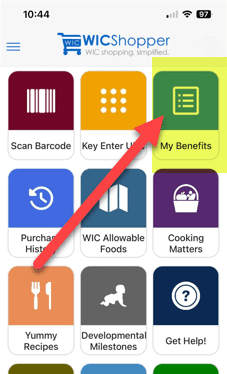
First, tap the new "My Benefits" button in the upper right corner of the app home page.
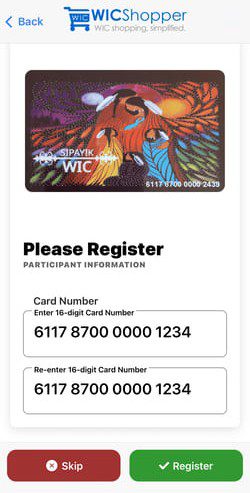
Next, you will enter your 16 digit eWIC card number. Your benefits balance is not available without registering your card. Tap the “Skip” button to skip registration. If you wish to proceed, enter your 16 digit eWIC card number and tap the “Register” button.
After registering your card, you will see your remaining benefits for the current month by tapping the “My Benefits” button.
You can also scan a product’s barcode when using this feature to know if it is WIC approved and to confirm if you have the benefits to purchase it. Use the "Find a WIC Office" feature in the app to contact your local WIC clinic with questions on how to use “My Benefits”.
