Look What's New!
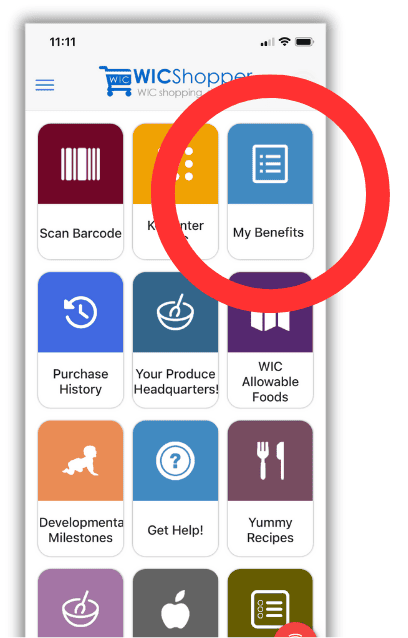
You can now register your WIC card in the WICShopper app by tapping the “My Benefits” button. Registration allows you to see your WIC benefit balance for the current month! After registering your WIC card, the date/time of your last known benefits will be displayed in “My Benefits” to help you confirm if your balance is current.
Checking Your WIC Benefits Balance
First, tap the new "My Benefits" button in the upper right corner of the app home page.
Tip: Not seeing the button? Swipe down on the homescreen to refresh the list!
Next, you will enter your 16 digit WIC card number. Your benefits balance is not available without registering your card. Tap the “Skip” button to skip registration. If you wish to proceed, enter your 16 digit WIC card number and tap the “Register” button.

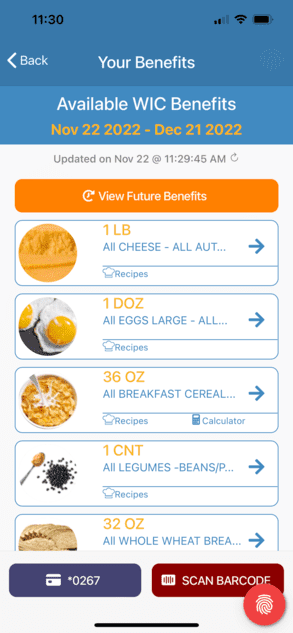
After registering your card, you will see your remaining benefits for the current month by tapping the “My Benefits” button.
You can also scan a product’s barcode when using this feature to know if it is WIC approved and to confirm if you have the benefits to purchase it. Use the "Find a WIC Office" feature in the app to contact your local WIC clinic with questions on how to use “My Benefits”.
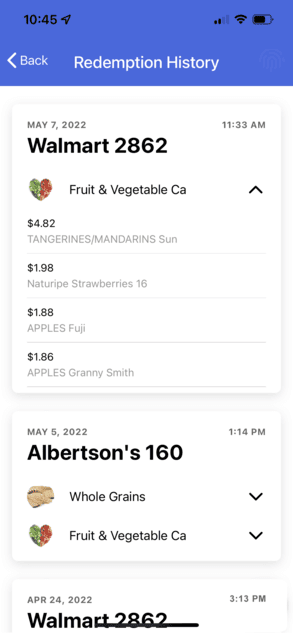
Curious about your past purchases?
You can now view all of your WIC purchases in the last 90 days using the "Purchase History" feature in WICShopper! You will see detailed information about where and when you shopped, along with everything that you purchased with your WIC benefits for each shopping trip.